
Best Lenovo IdeaPad 3 Battery Replacement Singapore
Is your daily driver losing its charge? Revive your Lenovo IdeaPad 3 today.
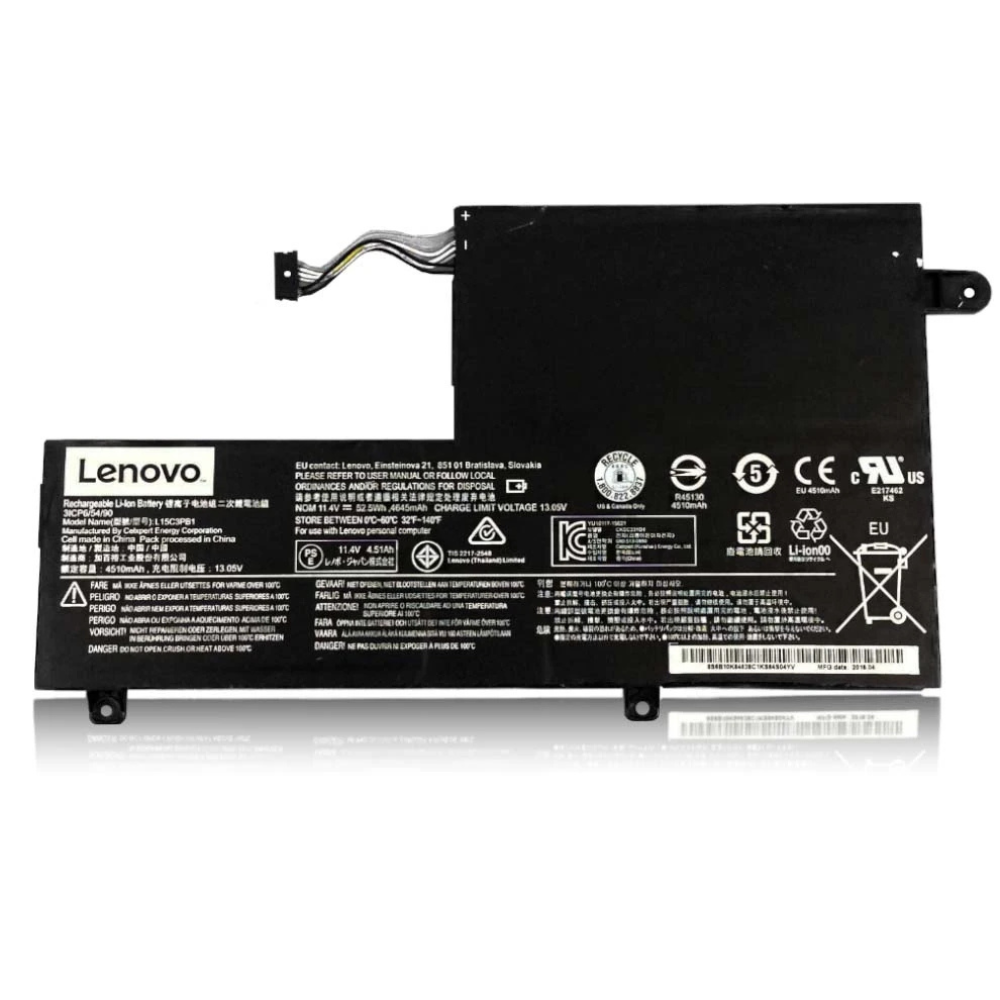
The Lenovo IdeaPad 3 is one of Singapore’s most popular laptops for students and office professionals due to its reliability and efficiency. However, constant daily use for studies, work, and streaming eventually degrades the lithium-ion battery. At StarLabs Singapore, we provide affordable, high-quality battery replacements to get your IdeaPad 3 running unplugged for hours again.
- Supported Models: IdeaPad 3 (14″, 15″, 17″ Series – e.g., 15IGL05, 14IIL05, 15ALC6)
- Service Time: 30 – 45 Minutes
- Warranty: 6 – 12 Months
- Location: Bugis, Bedok, Bukit Panjang, Queen St
Model Spotlight: Understanding Your IdeaPad 3
The IdeaPad 3 series balances performance with affordability. Unlike the premium Yoga series, it focuses on essential utility.
Battery Specifications & Drain Factors:
- Capacity: Typically ranges from 35Wh to 45Wh depending on the specific sub-model (14-inch vs 15-inch).
- Processor Impact: Intel Core i3/i5 or AMD Ryzen 3/5 processors are efficient, but heavy multitasking (Chrome tabs, Zoom calls) accelerates wear.
- Design: The battery is internally secured, requiring case removal to access, unlike older external battery laptops.
Common Signs Your IdeaPad 3 Battery is Failing
Because the IdeaPad 3 is often used as a daily workhorse, the battery cycle count increases rapidly. Look out for these symptoms:
- “Plugged in, not charging”: The laptop detects the adapter but the battery percentage refuses to rise.
- Sudden Shutdowns: The laptop turns off when the indicator still shows 20% or 30% remaining.
- Swollen Touchpad/Keyboard: A critical sign. As the polymer cells degrade, they may expand, pushing up against the touchpad or keyboard frame.
Comparison: IdeaPad 3 vs Other Series
| Feature | IdeaPad 3 | IdeaPad 5 | IdeaPad Gaming 3 |
|---|---|---|---|
| Battery Size | 35Wh – 45Wh | 57Wh – 70Wh | 45Wh – 60Wh |
| Repair Difficulty | Easy (Plastic Clips) | Moderate (Aluminum) | Moderate (Tight layout) |
| Typical Lifespan | 2 – 3 Years | 3 – 4 Years | 1.5 – 2.5 Years |
The StarLabs Advantage: We use high-grade cells that match the original specifications of your IdeaPad 3. This ensures the “remaining time” indicator in Windows is accurate and prevents random shutdowns.
DIY Guide: How to Replace a Lenovo Laptop Battery
Note: This guide outlines the general procedure for replacing batteries in Lenovo IdeaPad laptops. While screw locations vary slightly between the 14-inch and 15-inch models, the core steps are identical.
⚠️ Disclaimer: Opening your laptop case may void your official warranty. Laptop batteries contain lithium-ion chemicals which can be fire hazards if punctured. If you are unsure, please contact StarLabs for professional assistance.
Tools You Will Need:
- Precision Screwdriver Set (Standard Phillips #0 or #00)
- Plastic Pry Tool / Spudger (IdeaPad casing clips can be tight)
- Anti-static wrist strap (Recommended)
Step 1: Preparation
Shut down your Lenovo IdeaPad 3 completely. Unplug the AC adapter and remove any USB peripherals or SD cards.

Step 2: Remove the Bottom Case

Flip the laptop over. Locate the screws securing the bottom panel. Tip: Ideally, the IdeaPad 3 uses Phillips head screws. Some may be “captive” (they don’t fall out), especially near the hinge.
Step 3: Release the Clips

Insert your plastic pry tool into the seam between the bottom cover and the palm rest. Gently slide the tool around the edges to pop the internal clips. Lift the cover off.
Step 4: Disconnect the Battery Connector (Critical Step)

Locate the battery (the large black rectangular component). Follow the wires to where they plug into the motherboard.
Action: Use your fingernail or a plastic tool to gently slide the connector block out of the socket. Never pull on the wires themselves.
Step 5: Remove and Swap

Unscrew the screws holding the battery frame to the chassis. Lift the old battery out.
Installation: Place the new battery in the bay, screw it down, and firmly reconnect the plug to the motherboard.
Step 6: Reassemble and Calibrate

Snap the bottom cover back on and tighten the screws. Plug in your charger (required to “wake up” the new battery). Charge to 100% before use.
Need Help with Installation?
IdeaPad 3 clips can be fragile. If the cover isn’t snapping back or the battery doesn’t align, let us help.
Maximizing Battery Life Post-Replacement
After installing your new battery, how you treat it determines its lifespan. The IdeaPad 3 supports Lenovo’s software management tools which can significantly extend battery health.
1. Enable Conservation Mode
If you mostly use your IdeaPad plugged into power (e.g., at a desk), open the Lenovo Vantage app and enable “Conservation Mode.” This limits the charge to 60%, preventing the chemical stress of staying at 100% constantly.
2. Initial Calibration
For the first cycle, charge your new battery to 100%, keep it plugged in for 2 hours, then use the laptop until it shuts down automatically. Recharge it to 100% without interruption. This helps the Windows battery gauge read accurately.
Frequently Asked Questions
My IdeaPad 3 is slow. Will a new battery make it faster?
A bad battery can sometimes cause the system to “throttle” (slow down) to prevent crashing. If your IdeaPad has been shutting down randomly, a new battery will stabilize performance. However, for general speed improvements, we might also check if you need a RAM upgrade or SSD cleaning during the service.
How much does a Lenovo IdeaPad 3 battery replacement cost in Singapore?
The IdeaPad 3 uses standard internal batteries which are generally very affordable. Replacement costs typically range between $XX and $XX SGD. Prices depend on whether you have the 35Wh or 45Wh version. Contact us with your model number (e.g., 15IGL05) for an exact quote.
Will I lose my data during the battery change?
No, your data is stored on the hard drive or SSD, which is separate from the battery. Changing the battery does not affect your files, photos, or documents.
How long does the repair take?
For the IdeaPad 3 series, the process is straightforward and typically takes 30 to 45 minutes. You can wait in our shop while we perform the replacement.
